Metal Text Effects for Bold Digital Designs
Transform Typography with Realistic Metallic Styles
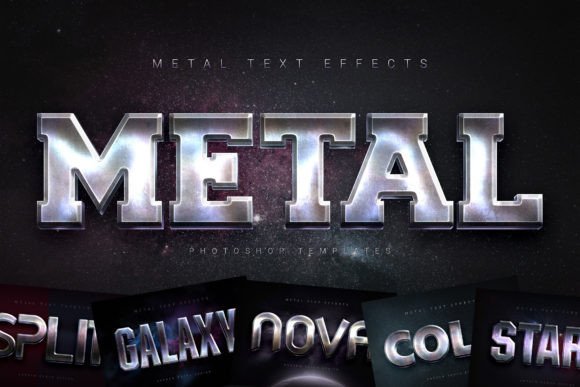
Typography plays a crucial role in visual communication, whether you're designing a poster, a website banner, or a cinematic title. With Metal Text Effects, you can elevate your text from plain to powerful using a variety of realistic metallic finishes. This collection offers a modern and industrial aesthetic that adds depth, shine, and sophistication to any design project. Whether you're a beginner exploring graphic design or a professional looking for a quick, high-quality solution, these effects are designed to simplify the creative process while delivering impressive results.
Why Realistic Metal Text Matters Across Industries
The appeal of metallic text isn't limited to one field or audience. From marketing materials to personal projects, the visual impact of polished chrome, brushed steel, or oxidized metal can communicate strength, elegance, or innovation. For example, a small business owner might use these effects to create a striking Facebook cover that reflects the premium nature of their brand. Meanwhile, a filmmaker could apply a weathered metal style to a movie title for a gritty, industrial feel. Educators designing presentation slides might find that metallic headings help maintain visual interest without sacrificing professionalism.
Beginners and Pros Alike Can Benefit
One of the standout features of Metal Text Effects is its accessibility. New designers often struggle with complex layer styles or manual texturing. This collection removes that barrier by using smart object replacement—just insert your text or design, and the effect updates automatically. That simplicity makes it ideal for beginners who want to experiment with high-end visuals without mastering advanced Photoshop techniques.
On the other hand, experienced designers appreciate the flexibility and quality. Each of the six included styles is built with well-organized layers, allowing for deep customization. Whether you're adjusting lighting, adding background textures, or blending effects, the layered structure supports creative exploration without compromising clarity or resolution.
How Different Users Evaluate Value
When evaluating tools like Metal Text Effects, users often prioritize different factors based on their needs and experience level. Here’s how various audiences might approach the decision:
- Freelancers & Agencies: May focus on speed, quality, and commercial usability. Having a set of ready-to-use, high-resolution templates can save time while ensuring consistent, client-ready results.
- Entrepreneurs & Marketers: Often care about presentation and brand alignment. A polished YouTube banner or social media graphic using metal text can reinforce a premium or bold brand identity.
- Students & Educators: Might look for learning value and adaptability. These templates can serve as examples of layer structure and smart object use, helping learners understand professional design practices.
- Hobbyists & Creators: Typically seek flexibility and creative freedom. The ability to edit and combine effects opens up possibilities for unique personal projects, from album covers to digital art.
Practical Uses Across Design Projects
Metal Text Effects are versatile enough to fit a wide range of applications. Here are a few real-world examples:
- A blogger designing a website banner can use brushed steel text to convey a modern, tech-focused aesthetic.
- A local gym promoting a new strength-training program might use bold chrome text on a flyer to symbolize power and endurance.
- An indie filmmaker could apply oxidized metal text to a movie poster to evoke a post-apocalyptic tone.
- A music producer might incorporate metallic titles into a YouTube cover to match the vibe of a hard-hitting track.
Each project benefits from the same core features: high resolution (3000×2000 px at 300 DPI), smart object integration, and ease of editing. Whether you're working in Photoshop CC2018 or the latest 2023 version, compatibility is built in, so you don't have to worry about software limitations.
What You Get and How It Helps
The package includes six Photoshop templates (PSD), six example images (JPG), and a PDF help file with font links and setup instructions. This structure supports both visual learners and those who prefer step-by-step guidance. The included fonts help maintain consistency, and the instructions ensure you can start using the effects right away without confusion.
For users who need to deliver fast results—like social media managers or event planners—having a ready-to-use template can be a lifesaver. Meanwhile, those who enjoy tinkering with design elements can dive into the layers and tweak colors, shadows, and textures to suit their vision.
Is Metal Text Effects Right for You?
If you're looking to enhance your designs with a touch of industrial flair, Metal Text Effects could be a valuable addition to your toolkit. It’s especially useful if you want high-quality results without spending hours on detailed texturing. Whether you're creating a promotional poster, a cinematic title, or a website header, these effects offer a balance of realism, flexibility, and ease of use.
Ultimately, the decision comes down to your project needs, design experience, and desired visual impact. For many users, the ability to create professional-looking metal text in seconds makes this collection a worthwhile investment—whether you're a beginner just starting out or a seasoned pro looking to streamline your workflow.